 Contact
 October 3, 2008
 Tom Kranz

SGI has their complete publications library online – Owner’s Manuals, Man Pages, Release Notes, the lot.
The URL is http://techpubs.sgi.com.
Their Technical Publications are also available as downloadable PDFs.
SGI has their complete publications library online – Owner’s Manuals, Man Pages, Release Notes, the lot.
The URL is http://techpubs.sgi.com.
Their Technical Publications are also available as downloadable PDFs.
There is a range of different operating systems available for various machines produced by SGI. The main SGI Operating System home page can be found here.
IRIX is SGI’s SVR4 based Unix.
The IRIX hompage can be found at http://www.sgi.com/developers/technology/irix/index.html
Windows NT – SGI’s Visual Workstation range were Intel-based workstations running NT 4. Although there was a port of NT to MIPS, none of the MIPS powered SGI machines will run NT.
The SGI NT home page used to be found at http://www.sgi.com/developers/technology/nt/index.html. Check out http://www.webarchive.org to see if there are any archived pages left.
Linux – SGI’s most recent range of servers are powered by Intel processors and run Linux. SGI has been quite active in the Linux community, extending existing parts of Linux, and making available SGI developed enhancements.
The SGI Linux home page can be found at http://www.sgi.com/developers/technology/linux/index.html
Linux on SGI – the Linux on SGI home pages cover an SGI port of Linux to run on the Visual Workstations, as well as a MIPS port to run on the SGI Indy.
The Linux on SGI home page can be found at http://www.linux.sgi.com
NetBSD – there is a port of NetBSD to some of SGI’s MIPS based boxen.
If you’d like to see what SGI has been up to in the Open Source community, SGI has a page up within Developer Central.
XFS is SGI’s scaleable, high performance extent-based filesystem. CXFS is an evolution of XFS that allows multiple clients to access the same filesystem at the same time on your SAN.
As systems scale and data volumes grow, access to, and manipulation of that data becomes a serious bottleneck.
I’ve found that many people are unaware of CXFS, or it’s benefits, and in general there’s a fair amount of confusion over the difference between concurrent access to a SAN filesystem versus shared cluster filesystems, as provided by something like Clustered VxFS.
So, I’ve collected together some documents and information which will give a good grounding on CXFS, and hopefully help show what an impressive feat it is.
DMF – Data Migration Facility – is a valuable tool that can live off the back of CXFS. You might be familiar with the concepts of HSM – Hierarchical Storage Management. DMF is pretty much the same thing.
I highly recommend not only checking out http://freeware.sgi.com but also pages on the Other Sites page for other software.
Download: fsn.tar.Z
Not one I’ve written myself, but this is the ELF binary of the famous FSN, which featured in Jurassic Park. You can find out more by reading this post.
All the other applications on this page have been compiled using GCC under IRIX 6.5 on my Octane
Download: clone_root_disk.ksh
The XLV/XVM plexing option is expensive – very expensive. Yet everyone needs a backup of their root disk. This korn script can be run nightly from cron, and will clone your root disk. All you need is another disk in the machine, which has already been partitioned by fx, and away you go!
The script is pretty straightforward, so can easily be modified to clone other important disks in your machine.
Version: Quake2 3.20
Download: SGI Quake local mirror
Dug out from an old backup tape, here’s my mirror of the SGI Quake pages from SGI’s website. Quake, Quake2, plus some entertaining mods like Action Quake 2.
Version: 4.1.9 (unstable branch)
Download: allegro-4.1.9.tardist
Allegro is a cross-platform gaming library – similar to SDL. Off the top of my head, you’ll need ESD installed to get sound. There’s an ESD tardist on the SGI Freeware website.
The Allegro homepage can be found at http://sunsite.dk/allegro
Version: 1.0
Download: elite-tnk.tardist
Elite is the greatest computer game known to man. Ever. Elite:TNK is the result of a project by Christian Pinder to reverse-engineer Elite from the original BBC disk version.
This requires Allegro, and runs splendidly on my Octane. It installs in /usr/local/elite-tnk, and the binary (newkind) must be run from within there.
The Elite:TNK home page used to be found at http://www.cjpinder.clara.net/elite.html, but this site now appears to be dead.
Version: 1.2.1
Download: actx-1.2.1.tardist.gz
ActX is a collection of anime window sitters (Active X Window System).
The home page can be found at http://kurumi.sakura.ne.jp/~chimari
Version: 0.31
Download: akaneclock-0.31.tardist
AkaneClock is an excellent anime clock. Lots more fun to have sitting on your desktop than the normal clock.
The home page can be found at http://kurumi.sakura.ne.jp/%7Echimari/ActX
Version: 0.4.2
Download: aterm-0.4.2.tardist
aterm is my preferred terminal. It allows background transparency, and with the Buffy GTK theme fits right in with the Indigo Magic desktop.
The home page can be found at http://aterm.sourceforge.net/
Version: 0.9.24
Download: prngd-0.9.24.tardist
PRNGD is the Pseudo Random Number Generator Daemon – a source of entropy. You’ll need a decent source of entropy for any cryptographic applications – OpenSSL, for example. PRGND saves any entropy it has when it’s shutdown – this means you have a strong source of entropy right from when your machine boots. It also doesn’t generate a ‘pool’ of entropy, so, unlike EGD, it can’t be drained and won’t block.
The home page can be found at http://www.aet.tu-cottbus.de/personen/jaenicke/postfix_tls/prngd.html
Version: 1.0.6
Download: gnupg-1.0.6.tardist
GNU Privacy Guard is an OpenPGP compliant Open Source replacement for PGP. Personally, I’ve used PGP 2.6.3i for donkeys years, but more and more software appears to be written to use GnuPG specifically – hence this tardist. This version isn’t the most recent, but works fine for me. I may build a newer tardist sometime if there is enough demand.
The home page can be found at http://www.gnupg.org/
Version: 1.1.4
Download: zlib-1.1.4.tardist
zlib is a compression library. Pretty much anything that will use compression will need this. This version fixes some potential security flaws with previous versions. Note that any applications statically compiled against older versions will need to be re-compiled against this new version to use the fixes.
The home page can be found at http://www.gzip.org/zlib/
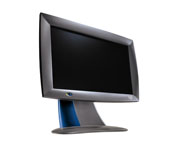
Silicon Graphics’ 1600SW TFT display is a unique piece of kit. Due to it’s strengths it’s still sought after today, despite dating from 1998. However, like everything SGI produce, it looks very nice indeed, but is far from ‘normal’. Yes, even their monitors are a bit odd. Don’t expect to buy one and just plug it in.
This page is a collection of FAQs and information about this excellent display.
SGI have a collection of 1600SW FAQs on their site. These are a bit outdated, as they refer to issues from when the monitor was in production, but they still have some useful information.
They can be found at http://www.sgi.com/products/legacy/1600sw_faq/
A local mirror can be found here.
What’s so good about the 1600SW anyway?
You mean, apart from the usual stylish SGI design? :-)
The two main things it has going for it are an incredibly fast pixel update – which means none of the using streaking or blurring you get from a TFT – even when playing games.
It’s also the only TFT (still!) to support a native 16:9 resolution. Not only does this mean that content creators can fit two full screens of work on, side by side (ie. two screens worth of 800×600 resolution) but it is also very handy for working with digital video.
Check this HotHardware review from December 2001: http://www.hothardware.com/viewarticle.cfm?articleid=473
What’s the connector on the 1600SW?
It’s OpenLDI, which was a (superior) alternative to DVI. Back in the day, there were two emerging digital formats – OpenLDI and DVI. Think Betamax and VHS. SGI went for the technically superior OpenLDI, and everyone else went for DVI.
So, can it plug into a DVI card then?
No, the connector and the signal are completely different.
What cards natively support the 1600SW then?
There are only 3:
What machines natively support the 1600SW?
Again, there were only 3 – all SGIs:
These machines will only support the 1600SW when they are fitted with a small credit-card sized adapter card. It fits onto the motherboard via a custom connector, and provides an LVDS connector for the on board graphics. These adapters occasionally pop up on Ebay, and will only work with the 1600SW.
So how can I use the 1600SW with my modern machine?
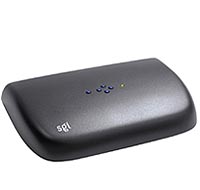
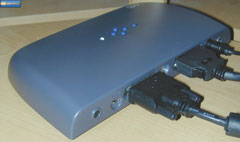
You’ve got a few choices here. The original is the MultiLink Adapter (MLA) from SGI. This takes HD15 analogue or DVI input, and provide LVDS output. They are obviously sought after, and often cost as much as the 1600SW itself.
 |
 |
The other, newer, option is the PIX Link adapter from PIX Solutions – their web site is http://www.pixsolution.com/ The PIX Link is a DVI->LVDS converter. There is a Pro version which offers various extra options for choosing resolution, colour temp, etc.
I have a PIX Link and it works very well indeed.
You can also buy a PCI-based pass-through adapter. It’s PCI based so that you don’t need another external box – it takes power from the PCI bus and requires no OS drivers to function. The card has been developed by Dan Evanicky (head of the engineering team responsible for the 1600SW) and Oscar Medina. The card is distributed as the GFX-1600SW by UltraFlex and the EP-1600 by Sharper Technology.
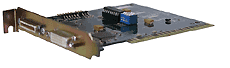
UltraFlex also sell 1600SW displays with the GFX-1600SW mounted inside the flat-panel. The relevant power lines exist in the monitor to make this possible. They will also mount a converter inside an existing panel, and carry out repairs.
More details can be found at http://www.ultraflexinc.com/monitor.html
As of December 2008, the only adapter available from new is the GFX-1600SW, which is available from Sharper Technology and Niktec. I’ve an updated post showing fitting a GFX-1600SW into my Fuel.
Now I’ve got the 1600SW working with my machine, but the display is funny?
The 1600SW’s native resolution is 1600×1024 @ 60Hz, which provides a true 16:9 display. Anything else is going to look odd – you’ll have letterbox blank spaces at the top or the side of the screen.
Also note that LCD displays, unlike CRTs, operate at a set resolution. Try to drive them at anything else and they will scale the image. This means it may not look in proportion, or the fonts look odd. With an LCD screen, you should always try and drive it at it’s native resolution.
What’s this about Super Wide Savvy cards?
It’s marketing fluff. It basically means a graphics card which can support 1600×1024 resolution. Most modern cards should be able to do this.
What’s this ColorLock thing?
The ColorLock is a widget that hooks over the top of the screen, and plugs into the back. You can then calibrate the colours using the display drivers on your host machine.
Note display drivers being the key phrase here – the ColorLock will only work with those machines that natively support the 1600SW. It’s useless on anything else.
What are the specs. of the 1600SW?
| Brightness | 170 Cd/m2 min., > 235 Cd/m2 maximum |
| Colour Resolution | 16.7 million true colors |
| Contrast ratio | 350:1 typical |
| Display area | 14.6 inches (H) x 9.3 inches (V) (369.6 mm (H) x 236.5 mm (V)) 17.3 inch (44 cm) diagonal |
| Dimming range | 35% to 100% |
| Dot pitch, dots per inch | 0.23mm, 110dpi |
| Pixel resolution | 1600 H x RGB x 1024 V (4,915,200 subpixels) |
| Response time | 40 ms typical combined rise and fall 13ms Rise 27ms Fall |
| Viewing angle | Horizontal: ±60° Vertical: +45°/-55° |
| White balance range | 5000° K to 7000° K, adjustable through software on the host computer |
How else can I mount the screen?
The 1600SW has a standard 75mm VESA mounting at the back. Two hex bolts secure the display to it’s pedestal. Lift the screen up to the top of the pedestal and they should be easy to get to.
As well as standard 75mm VESA mounts, you can also use 100mm VESA mounts with an adapter.

