Management Speak

Funny Stuff

As a Sysadmin, there will be occasions when users – or management – may use some underhand tactics to push through some noxious change. If you’re not prepared, these tactics can leave you defenseless to counter their arguments, and thus your machines will be pillaged by those who don’t really know any better.

In order that you may more effectively defend yourself against such base tactics, I’ve compiled here a list of strategies to use – both offensive and defensive – to ensure you get to do what’s best for your machines.

Not only can you have fun using them yourself, but also you can play a "Buzzword Bingo" equivalent as you try and spot other people doing it, too!

We’ll examine the following in terms of a ‘challenger’ and a ‘victim’. Note I use these phrases because, in conventional warfare, the victim is just that – a victim who loses out to a challenger.

Reaching Out

Railroading

There are Donkeys in Paraguay

Juggling Frogs and Weasels

Exaggerate the Case

Extreme Politeness


Reaching Out

Overview: Reaching Out (not to be confused with the ‘Reach Around’) is what Catholic Priests do to small boys. It is where specially trained officers sit in a non-threatening playroom with a child and say “Show me where the Bad Man reached out to you, on this doll”.

Marketers – and, increasingly, insecure managers of the bed-wetting variety – have also started using this buzzword phrase when what they actually mean is “spoke to”.

Unless you really DID stick your thumb up your customer’s arse, you do not ‘reach out’ to them. You ask them a fucking question. OK?

Deployment: Banned by international convention

Usage:

NO. Using this phrase is announcing to the world that you inappropriately touch small children. And possibly animals as well.

English law clearly states that, if you ever hear anyone using this reprehensible phrase, you are allowed to immediately bitch slap them. HARD. Just wind back, and deliver that bitch slap with all your might.

If you don’t live in England, it doesn’t matter – cry “God Save The Queen” as you bitchslap the smug smile off the face of that smarmy little ponce.

Railroading

Overview: When the challenger wishes to push through an idea which will encounter resistance, they will overwhelm their victim with a constant stream of impossible to disprove statements. When the victim gives up hope and just starts agreeing with everything in an attempt to get the challenger to go away, the challenger slips in a small statement detailing what they actually want to get done. The victim will be so overwhelmed that they will blindly agree, and the challenger can then carry the day.

This works particularly well if the victim is busy or distracted.

Deployment: Offensive

Usage:

<The Challenger wishes to get elevated privileges>

Challenger: Well, I know you’re busy, and that you’ve got a lot to do, but I don’t want to burden you with more stuff, and I know you’ve got a ton of stuff to clear anyway.

Victim: Yes ……

Challenger: So rather than bother you, and waste your time – and I’m sure you’ll agree that we don’t want your time wasted, I mean you’ve got so much more important stuff to get done anyway

Victim: Well, but ….

Challenger: Because I know it wouldn’t take you long to do, but then you’d have to postpone something else, and everything else is pretty urgent – but isn’t it always that way?

Victim: Yes

Challenger: So if you’d agree it would make sense to do that then?

Victim: Well, yes, but was it …

Challenger: Excellent – I’ll make sure your manager knows we’ll go ahead with that and not interrupt you any more

Victim: Umm, I guess …


There are Donkeys in Paraguay

Overview: A challenger may often start spouting technically true – but utterly irrelevant – facts to support their case. The victim can use this simple ploy to disarm such tactics, without appearing confrontational or rude, thus derailing the challenger with little deviation from the true discussion.

Deployment: Defensive

Usage:

<The Challenger wishes to continue using rsh, despite a roll out of ssh>

Challenger: Well, you know, it’s not such a big deal, because many companies will use rsh internally anyway, and as we’ve got firewalls our internal machines are well protected, aren’t they?

Victim: Yes, and there are donkeys in Paraguay as well.

Challenger: What?

Victim: Sorry, I thought we were talking about things that were irrelevant to using rsh.

Challenger: But what does rsh have to do with donkeys?

Victim: Nothing. Which is why we are using ssh across the board. Thanks for your time though.


We’re just Juggling Frogs and Weasels

Overview: Tricky to say whilst keeping a straight face, but devastatingly effective if you can pull it off. To try and bolster their point, the challenger may start to mention technically impressive, but utterly unrelated, accomplishments, in an effort to make their idea seem less unpalatable. Works best in meetings as opposed to mano-et-mano confrontations.

Deployment: Defensive

Usage:

<Again, the challenger wishes to continue using rsh instead of ssh>

Challenger: Well, I once wrote a script that deployed a load of code using rsh, and it was really use to use and debug, and it was a great hit with all the other developers. And we’ve got all these other scripts which use rsh in all these great ways.

Victim: Well, we’re just juggling frogs and weasels now.

Challenger (and everyone else in hearing): What?

Victim: Well, that’s technically impressive, but it has no real relevance to what we’re discussing.

<while the challenger is disarmed, get in there quick>

Victim: Just replace rsh with ssh in your code – if you could write such impressive scripts, I’m sure something as basic as that would be a very quick thing for you to do.


Exaggerate the case

Overview: Gross exaggeration needs to be handled carefully – it needs to be so over the top that it’s obvious to even the most limited person that you’re being sarcastic, otherwise they may take your comment literally, and you’ll be so much more worse off. Works best in front of an audience.

Deployment: Both offensive and defensive

Usage:

<Once again, the challenger clings to the nirvana that is rsh>

Challenger: But I don’t see why there is a security risk in using rsh. It’s not like we’ve been hacked or anything.

Victim: Of course. I’ve been very narrow minded. In fact, I agree totally with you. We’ve no need of firewalls, or packet filters. I don’t think that our activities securing our Internet servers have really added any value. Indeed, I think I’ll just pass out the root passwords and be done with it. I mean, it’s not like we’ve been hacked, is it?

Challenger: ….. <possibly a tad upset too, for bonus points>

Victim: Exactly.


Extreme Politeness

Overview: Like many activities (like Extreme Ironing) Extreme Politeness is taking things to – well, the extreme. Note that the politer you are, the more rude you can be – see airport check-in desk staff for reference. The important thing here is not to lose your temper, while the challenger loses it big time. Again, an audience is required for greater effect.

Deployment: Defensive

Usage:

<still banging on about rsh>

Challenger: Look, I know what I’m doing – just give me back rsh.

Victim: Yes, I’m sure you do think you know what you’re doing – but I know what you’re doing as well. And I don’t really think that it’s something that’s in our best interests.

Challenger: I don’t care. I need rsh to get my work done.

Victim: I’m sure you do believe that, which is odd, because everyone else is managing to get their work done with ssh. I’d be tempted to think that this inability of yours to move forward is more a comment on your competence, rather than a statement about ssh.

Challenger: What? Are you saying I’m incompetent?

Victim: Not at all. I’m just pointed out – politely – that everyone is working well with ssh, and that you’re the only person who seems to be having difficulty. So it’s obviously not ssh that is the issue. Maybe you need to have some basic UNIX training, so you can understand that systems better.

Challenger: FFS! *basic* UNIX training! I’ve been a developer for over 2 years! I’ve spent ages on Linux systems – I’ve got one at home! I know what I’m doing, dammit!

Victim: Yes, I think it’s apparent to everyone now that you’re just using ssh as an excuse to cover your lack of progress on the project. I can’t blame you – it must be a bit humiliating – but surely it would be better if you just owned up, admitted things were a bit tough, and then maybe we could get someone to help you.

Challenger: What? Fuck you!

Hacks

Hacks

OK, it’s not big, and it’s not clever. Never mind, here’s a list of some of the hacks I’ve been responsible for.


The Octane KnightRider Light Bar

Right, remember KITT from Knight Rider? Back when David Hasslehoff was surrounded by a rather naff Pontiac Trans-Am instead of the silicon splendour of Bay Watch?

KITT was cool. And the coolest part about KITT was the moving LED bar he had on the bonnet. If you didn’t grow up with Knight Rider, think Cylons. If you didn’t grow up with Battlestar Galactica, then – to be honest – you were probably an abused child. Seek help.

Now, there are a couple of problems with the stock light bar on the Octane:

  1. It uses incandescant bulbs, which are more fragile than the XIO compression connectors
  2. It’s incredibly dull on such a cool machine

Greg Douglas, over at Reputable, sells some rather nice LED light bars. They’re cool, but the shipping costs of getting them to the UK ruled them out for me.

So, what to do?

With a bit of hunting, I found KnightLight’s web site. Now, if you can ignore the appalling image of tragic mullet heads fitting this stuff to their Vauxhall Novas, you can find a LED kit for a PC, at http://www.knightlight.co.uk/pr-ks3016.htm.

Right, now, assume you have acquired one of these trinkets. Now, down to the hackery to get it fitted as the Octane’s light bar.

Remove the existing light bar

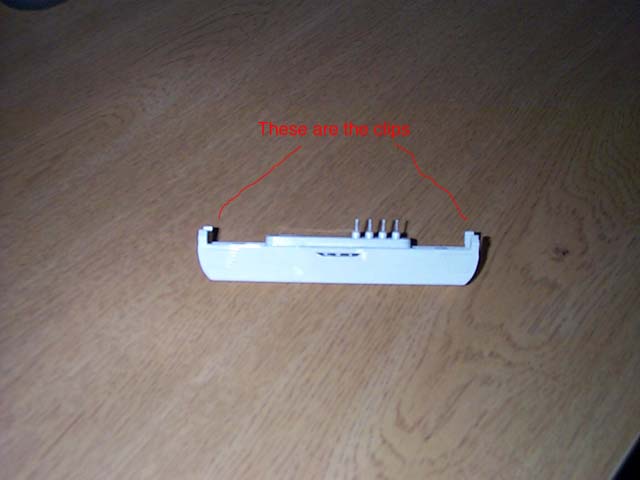
This is easy – they’ve got four ‘gripped’ tabs, a pair at either end. (See pictures below) Push them together and then pull it out towards you. Needs a bit of force, but easily done. You’ll notice there are four pins – these provide power.

Looking at the front of the Octane, the four sockets provide:

Pin 1 (left hand side) Pin 2 Pin 3 Pin 4 (right hand side)

3.6V

(All-is-well normal bulbs)

3.6V

(Testing, or "You broke me!" red bulb)

Unused
Ground


The LED bar will need a 5V supply, but after some extended testing (ie. none) I can conclude that it’s happy with a lower supply of 3.6V.

Attaching the LED bar

There are two ways to do this:

  1. The Proper Way – soldering wires and taking your time
  2. The Hack Way – bodge it a bit

Always remember – electricians tape is your friend.

Here’s what I did:

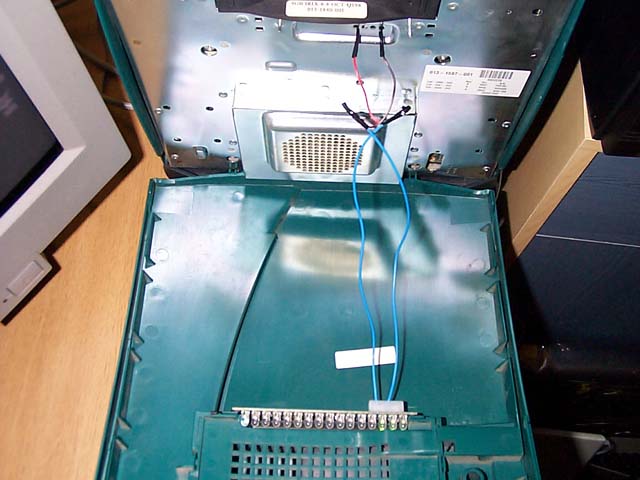
  • Cut off some wires from an old broken Sparc LX which had a similar sized connector on the end
  • Used a screw driver to lever open the pressed metal connectors inside the PC-style power connector
  • Jammed the wires inside the metal connectors, and then forced them shut again
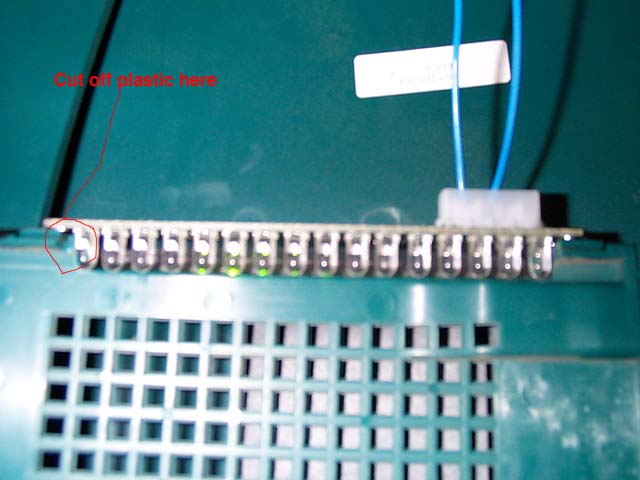
  • Next, I cut a small section away from the front panel, to fit the bar in place
  • I then stuck it in place with some electricians tape

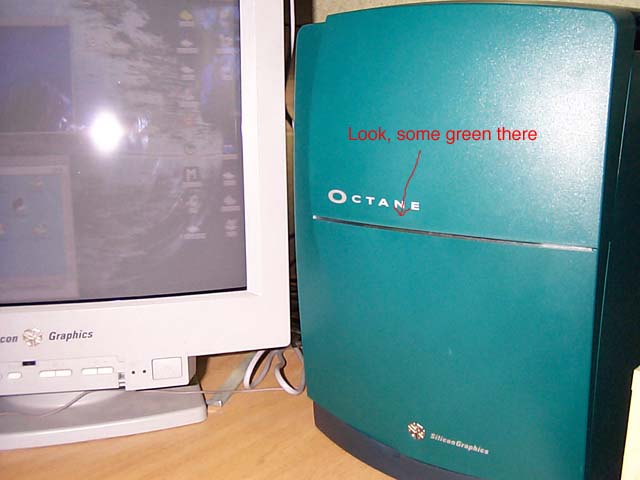
All you need to do now is put it all together and turn on your Octane – and away you go.

Pictures

No hack would be complete without some poor digital photography to provide the details.

Silicon Graphics FAQs and Guides

Silicon Graphics FAQs

Our collection of links to FAQs and other useful sources of SGI info. If there are some you think we’ve missed, or else you have something you want referenced/mirrored, then please get in touch.


Note: Reality is back! Check out http://reality.sgiweb.org/. Also note that reality.sgi.com also works again. If you’ve ever used Reality, consider using the PayPal link to help keep it going. Go on – what’s $20? Really?

  • The SGI FAQs were at http://www-viz.tamu.edu/~sgi-faq/index.html

    This site now appears to be dead, so check the local mirrors at /mirrors/www-viz.tamu.edu/sgi-faq/index.html

  • Ian Mapleson’s excellent SGI Tech pages – the place to go for SGI information.

    Ian has performance and model information for pretty much anything MIPS-based that SGI have produced. Lots of information comparing different systems, performance information, and old SGI press releases – you must have a look through here before you buy an SGI machine.

  • Christopher Spry’s excellent SGI Indy/IRIX administration pages can be found at http://www.cspry.co.uk/computing/Indy_admin/Indy_admin_index.html

    A local mirror is available here

  • Scott Henry maintains a very useful page covering how to install and configure PPP under IRIX. It used to be found on Reality at http://reality.sgi.com/scotth/remac/ppp-irix.config.html

    A local mirror can be found here

  • Douglas Scott’s SGI Audio Apps page used to be found at http://reality.sgi.com/dscott/audio.apps/index.html.

    A local mirror can be found here

  • Swift Grigg’s Indy ISDN FAQ can be found at http://www.reputable.com/textfiles/indyisdn.txt

  • Reputable Systems has the excellent IndyTech pages, which have a very thorough summary of the SGI Indy.

  • Jodeman’s SGI Stuff pages have been rescued by B&B Solutions, at http://www.bbsolutions.com/jodeman/

    A local mirror can be found here

  • Chris Pirazzi’s The Lurker’s Guide to Video can be found at http://www.lurkertech.com/lg/index.html

    A local mirror can be found here

IRIX Software

IRIX Software

The Nekochan community has been working hard porting the latest versions of popular and useful Open Source software to IRIX. They’ve come up with a distribution called Nekoware, and this is an essential software collection to get the most from your Silicon Graphics machine.

The Nekoware builds require IRIX 6.5 and are well thought out and structured, with the dependencies all taken care of.

You can download them from http://www.nekochan.net/what-is-nekowar.html. Stop by the forums there and give them props for such fantastic work!

SGI has a large range of free or evaluation software available for download. It can be found at http://www.sgi.com/software/

SGI also ships CDs with pre-compiled freeware with new systems. These freeware packages are regularly updated, and are freely available for download. They are tardist files, and so can be downloaded and installed with just one click.

The URL for SGI’s freeware site is http://freeware.sgi.com

One word of warning – the freeware packages have been compiled with SGI’s compiler. This means if you’re using GCC, you may run into problems.

For example, if you have downloaded the perl freeware package, and then try and compile some perl modules using gcc, it will fail – perl will have been compiled using the SGI compiler, and will expect the same for the modules.

In these cases, you will need to remove the freeware packages, and compile the app from source.

It’s also worth noting that there is a bug in recent versions of GCC, which appears in IRIX 6.2 and early versions of 6.5. Any program compiled with GCC that uses IP (for example, Apache or OpenSSH) will show all remote IPs as being 255.255.255.255. This isn’t too helpful. At the moment, it seems that GCC 2.7.2 was the last version that didn’t have problems with IRIX 6.2 – I would recommend installing this as your compiler. Recent versions of GCC 3 play nicely with IRIX 6.5.

SGI’s Software Products page can be found at http://www.sgi.com/software/ – it has links and details for SGI’s commercial software.

Other Software Links

  • Blender is an excellent freeware 3D modelling software package. It is also available commercially. The URL for the homepage is http://www.blender.org/

  • Douglas Scott has an excellent page of Audio and Music applications for SGI systems, originally at http://reality.sgi.com/dscott/audio.apps/

    I’ve setup a local mirror.

  • Bill Henderson maintains a page of links to all sorts of Public Domain software, originally at http://reality.sgi.com/billh/anonftp/

    Please email me if you know where a copy of this now lives.

  • Greg Lukomski maintains the excellent Unofficial Lightwave SGI Resource Guide at http://www.matchmove.com/sgi/sgi.html

  • SiliconBunny’s local mirrors have copies of some of the more popular software available – notably the various versions of Quake.

Games

When you’ve had enough in the office, or need a bit of light entertainment at home, have some fun with these:

Other Sites

More SGI Info

This is a list of other SGI related sites not covered elsewhere. All highly recommended – visit them all!

  • Gerhard Lenerz’s SGI pages

    Gerhard has a tonne of information on his site – pictures, specs., model summaries – well worth a look.

  • IrisIndigo

    Lots of useful info about the Indigo. I have a soft spot for these – they were the first SGI machine I ever saw and used. Still an impressive piece of kit.

  • Mood Indigo forums

    Some very active German SGI forums. Obviously you need to be able to read German :-) or if you’re adventurous you could try the Babelfish.

  • The SGI Zone

    Lots of useful tips and info, covering mostly Indigo2 and older kit

  • Useful IRIX software

    Andreas Backhaus has compiled an excellent list of useful software that’ll work on IRIX. Some good audio and graphics tools. here.

  • Marcus Herbert’s IRIX archive

    Marcus has an excellent archive of IRIX software. There’s all sorts of pre-compiled goodness here.

  • Nekochan.net

    Not only is Pete’s site visually stunning, he also has lots of goodies on there. I can highly recommend having a look through his Gallery, at the very least.

  • MicroCosmos

    James Holden’s new SGI related site. News, reviews – check out the File Typing Rules tutorial!

  • The SGI Addict – dead :-( – was http://www.sgiaddict.net

    Nice looking site with a good load of information, tips, and pictures.

  • Skywriter’s Big Old Nasty SGI Page

    There’s something lurking in his basement ….

  • Never Beige – dead :-( – was http://www.orcawerks.com/sgi/

    Some very useful O2 info and images, as well as some good non-SGI stuff.

  • Jodeman’s SGI & Stuff pages

    I don’t think these have been updated for a while, but a good load of links, info and images for Octane and older kit.

  • Marcus Herbert’s web site

    This is the place to look for images of SGI and SGI-related kit. If it’s rare or bizarre Marcus will have a picture of it.

  • Basquiat’s IRIX screenshots

    Some good images showing what you can do with Indigo Magic.

  • Alex’s SGI pages
    Excellent model summaries, and a wealth of information. Very good stuff.

  • Impact’s SGI Site
    Some good guides and nice pictures in the gallery.

  • Simon Pigot’s SGI pages

    Lots of Crimson and Power Series information.

  • Al Corda’s This Old SGI site
    Buckets of information on older machines like the 4D series, Personal IRIS, etc.

« Older Posts
Newer Posts »